We ran 40+ accounts through basically the same setup to figure out what was getting them banned.
The biggest difference we found wasn't session length, breaks, or whether an account botted for 6 hours or 12.
It was the mouse.
If you've spent any time around OSRS botting communities, you've probably heard the same advice a hundred times:
Don't bot overnight. Take breaks. Randomize your sessions. Mix in some manual play. Don't do exactly the same thing every day.
None of that is necessarily bad advice. But after spending the last few months testing our own plugins, I think people put way too much emphasis on it.
We kept seeing accounts with fairly conservative schedules get banned while other accounts doing objectively stupid hours survived.
Eventually we started testing the input system itself.
The results were pretty hard to ignore.
What we tested
The setup was deliberately boring.
We split 40+ fresh F2P accounts into two groups and ran them through the same basic progression:
mine some ore to get starting GP, then move over to smelting steel bars at Edgeville.
Same activities. Same plugins. Same general scheduling logic. Same world rotation.
The main difference was mouse movement.
Group A used a fairly standard bot mouse: Bézier curves with some sinusoidal noise added to make the paths less perfect.
If you've looked through open-source bot clients before, you've probably seen some variation of this. Pick a start point, pick a target, generate a curve between them, add a bit of randomness, click.
It looks fine when you watch it.
Group B used the mouse system we'd been working on, which was built by recording real mouse movements and trying to reproduce the properties we saw in those recordings.
Each account also had its own schedule. Some played around six hours per day, others pushed closer to twelve. Login times and session lengths varied between accounts and from day to day.
There were 20+ accounts in each group.
What happened
Group A got wiped.
Not simultaneously, but the bans started showing up around 15 to 20 hours of total playtime. Some accounts lasted a couple of days. Others barely got through their first long session.
None made it beyond three active days.
Group B was completely different.
At the time I'm writing this, every account in that group has been running for more than two weeks.
And these aren't accounts doing tiny two-hour sessions either. Some of them have regularly been doing 10+ hour days.
That's obviously not enough data to claim we've reverse-engineered Jagex's bot detection. We haven't.
But when you run the same content on 40+ accounts and changing one part of the input stack produces that large a difference, it's worth paying attention to.
And so far, changing the mouse has made a much bigger difference for us than changing session lengths ever did.
The problem with most bot mice
The funny thing is that a normal bot mouse doesn't necessarily look robotic.
Watch a Bézier mouse move across the screen and it seems pretty convincing. The cursor follows a curved path. The speed changes. There's some randomness.
Then we started recording the movements and plotting them.
That's where things got weird.
The paths are way too clean
Real mouse movement is messy.
You start moving in roughly the right direction, drift a little, correct, overshoot occasionally, then make a couple of tiny movements when you're already close to the thing you're trying to click.
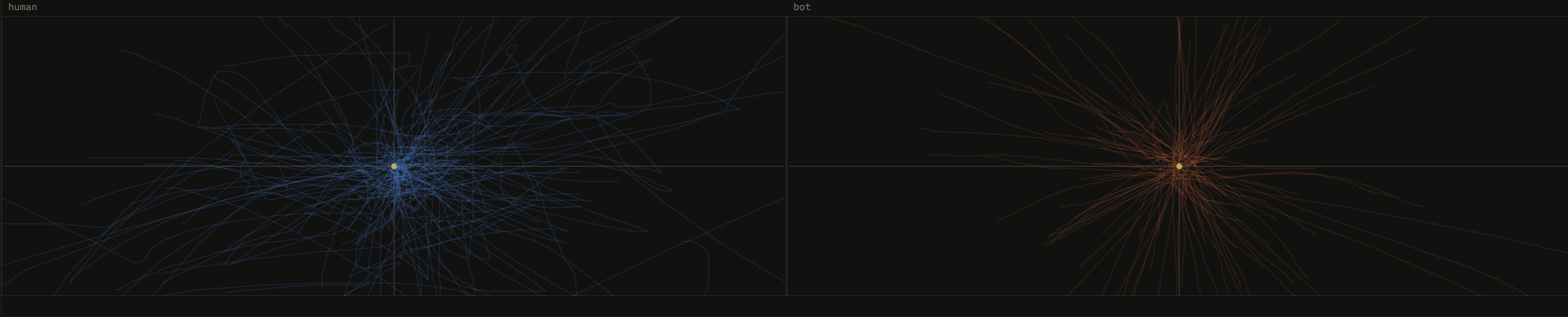
If you overlay hundreds of human movements, you get a mess.
That's what you'd expect. Your hand doesn't have the target coordinates available before it starts moving.
Our old generated movements looked nothing like that.
They formed these extremely clean arcs toward the target. When you plotted enough of them together, they almost looked like spikes radiating outward.
We started calling it the sea urchin.
Once you've seen the plot, it's painfully obvious.
The speed is wrong too
The pattern is the loudest tell. It's the one you can spot in a single plot, without measuring anything.
But it isn't the only one.
Humans also don't move the mouse at a constant-ish speed.
Most movements have a quick initial acceleration followed by a longer slowdown as you get closer to the target.
The last part of the movement is usually where all the little corrections happen.
Our generated movements were almost backwards.
They'd accelerate, cruise along most of the path, then stop.
They looked smooth on screen, but the velocity graphs looked nothing like the human recordings.
Humans spend a surprising amount of time correcting
This was probably the biggest thing we underestimated.
The first movement toward a target is only part of the action.
In our recordings, the initial "throw" toward the target was often around 40 to 50% of the movement. The rest was slowing down and correcting.
A mathematical curve doesn't really need to do that.
It already knows exactly where the target is.
So a typical generated mouse spends most of the movement heading directly toward the endpoint and almost no time figuring out how to actually land there.
That's great if you're trying to write a precise cursor animation.
It's probably not great if you're trying to imitate a hand.
Bots are weirdly still
Another stupidly obvious one once we measured it: humans don't leave the mouse perfectly motionless.
Even while you're waiting for something in-game, your hand moves slightly. A few pixels here, a small adjustment there.
Meanwhile a bot happily leaves the cursor sitting on exactly (614, 382) for fifteen seconds until the next action starts.
Then it suddenly comes alive again.
Watching the game normally, you'd never care.
Looking at input data over hours, it sticks out.
So we rebuilt the mouse
Our first attempts at fixing this were basically what everyone else does: start with a nice mathematical path and add more randomness.
More noise. More control points. Random speeds. Random overshoots.
It helped a little, but we eventually realized we were approaching the problem backwards.
Instead of asking:
How do we make this generated curve look more human?
We started asking:
What does an actual human movement look like, statistically?
So we recorded manual OSRS sessions and built tooling around analyzing the resulting movements.
Path shape, velocity, acceleration, corrections, overshoots, idle movement, target distance, movement duration, and a bunch of other stuff.
Then we built the generator around reproducing those behaviors rather than producing a perfect path first and trying to ruin it afterward.
The result is intentionally kind of bad at moving the mouse.
It drifts.
It starts heading somewhere before fully settling on the final trajectory.
It overshoots sometimes.
It slows down and makes tiny corrections near the target.
Basically, it behaves more like someone dragging a physical mouse around and less like a function interpolating between two coordinates.

We also vary the parameters over longer sessions.
Someone who's been playing for six hours doesn't move exactly like they did five minutes after logging in. Movements get a little slower and a little less precise, and corrections become slightly more common.
We're still experimenting with this part, but it showed up consistently enough in our recordings that it made sense to model.
Each Pluginscape installation also gets its own movement profile.
That part matters because making one "perfect human mouse" and running the exact same statistical profile across hundreds of accounts would create another fingerprint of its own.
Does this mean Jagex only cares about mouse movement?
No.
And I wouldn't trust anyone claiming they know exactly what Jagex's detection system looks at.
There are obviously a lot of possible signals: account history, activities, session patterns, client behavior, interactions, inputs, and probably plenty of things we haven't thought of.
What our tests do suggest is that mouse movement deserves a lot more attention than it gets.
Session length is inherently messy as a detection signal.
Real OSRS players are insane.
People play fourteen-hour sessions. People click the same tree for days. Someone will decide they're going to get 99 Fishing using shrimp in Al Kharid purely because they think it's funny.
Human behavior has enormous variance.
Input data is different.
When you collect thousands of mouse movements, patterns start appearing that aren't particularly obvious while watching someone play.
And if your generator produces those same patterns over and over again, changing your login schedule from 7 hours to 6 hours and 43 minutes probably isn't going to fix the underlying problem.
That's the main thing we took away from these tests.
We used to spend a lot of time worrying about schedules.
Now the input layer is one of the first things we look at.
WindMouse and Bezier curves: how standard bot mice work
To see why Group A looked the way it did, it helps to know how the common generators are built. Almost every bot mouse you'll find is one of two families, and both start from a path and add noise on top. What the client actually records about your mouse is covered in how Jagex detects bots.
WindMouse: a physics model
WindMouse is the most influential mouse movement algorithm in the OSRS automation space. Originally published over a decade ago and open-sourced, it remains the foundation that most serious implementations build on.
Instead of plotting a path and moving the cursor along it, WindMouse models the cursor as a physical object with mass, acted on by two competing forces.
Gravity is a constant-magnitude vector that always points toward the destination. It pulls the cursor toward where you want to click, mimicking the intentional component of hand movement.
Wind is a smoothly-varying random vector that introduces organic deviation from the straight-line path. Wind doesn't change randomly at every pixel; it evolves gradually, drifting in direction and magnitude over time. This creates a flowing wobble rather than the jittery noise you'd get from per-pixel randomization.
The interplay between gravity and wind produces paths that curve toward the target with realistic momentum. The cursor wanders slightly off course, gets pulled back, wanders again, converges. Near the destination, gravity dominates and the path tightens.
The parameters that matter:
Wind magnitude controls how much the cursor deviates from a straight line. Too high and the movement looks drunk or aimless. Too low and you get near-straight paths that look mechanical.
Gravity magnitude controls how strongly the cursor converges toward the destination. Balanced against wind, it determines whether the cursor takes a wandering scenic route or a purposeful arc.
Target area and overshoot are where implementations diverge. Some versions add deliberate overshoot past the target followed by a small correction movement. This matters most for small targets like inventory slots, prayer icons, or minimap clicks, where a real player frequently overshoots by a few pixels.
Speed modeling is the other critical component. Real mouse movements accelerate from a standstill, reach peak velocity, and decelerate as the cursor approaches the target. WindMouse handles some of this through its force model (the cursor has mass, so it takes time to accelerate and decelerate), but many implementations add explicit speed curves on top.
Bezier curves
Bezier curves are the other major family, used by SIMBA and most of its derivatives, and they're what Group A ran.
Instead of physics simulation, Bezier paths use control points to define a smooth mathematical curve between start and destination. A cubic Bezier curve uses two control points placed off the direct line; the cursor follows the curve defined by these points. Variable speed along the curve, combined with random control-point placement, produces organic-looking trajectories.
They're computationally cheap, easy to tune, and guarantee that the path ends exactly at the destination. The catch is the one we saw in our plots: without careful parameterization, Bezier paths have a characteristic smoothness that's too consistent. Real human paths have micro-irregularities (tiny wobbles, slight hesitations, momentary speed changes) that pure Bezier curves don't produce. Most implementations add noise layers on top to address this, which is exactly what Group A's sinusoidal noise was.
Replaying recorded paths
A third approach is to record real mouse movements and replay them, transformed (rotated, scaled, mirrored) to fit the current start and destination. One bot developer did this for a mining bot. The paths were unquestionably human-shaped, because they were literally human paths. The account was still banned at 87 Mining, which suggests that path shape alone isn't enough. Realistic mouse paths combined with robotic click timing or zero camera movement still produce a detectable fingerprint.
Click timing: why uniform random is a red flag
You can have the most human-looking cursor movement in the world, but if your click timing is wrong, the behavioral fingerprint is still detectably non-human.
The problem with uniform random. The most common approach in amateur scripts is something like "wait a random delay between 500 and 800 milliseconds." This produces a flat distribution: every delay in that range is equally likely. Plot a thousand of these delays on a histogram and you get a rectangle.
Human reaction times don't look like rectangles. They produce a bell curve: most responses cluster around a central value, with progressively fewer responses at the extremes. A classifier trained on real human timing data would flag a flat distribution immediately, because no human produces one.
Gaussian (normal) distribution is significantly more realistic. Define a mean (say, 650ms) and a standard deviation (say, 80ms), and most clicks will land near 650ms, with occasional faster or slower outliers. The standard deviation controls how "consistent" the player appears: a tight distribution (SD of 30ms) looks like a focused, experienced player; a wider one (SD of 120ms) looks more casual or distracted.
Beyond distribution shape, several other timing factors matter:
Fatigue modeling. Real players slow down over time. After two hours of the same activity, click intervals should be measurably longer than they were in the first 15 minutes. A gradual increase of 5-15% over a multi-hour session matches the natural decline in human reaction time as attention fades.
Context-dependent timing. You react faster to expected events than unexpected ones. When you're woodcutting, you know the tree will fall; your reaction is primed and fast. When a random event appears unexpectedly, there's a noticeable delay before you respond.
Burst patterns. Real players click rapidly in bursts during high-interaction phases (banking, gear switching, inventory manipulation), then slow down dramatically while watching an animation play out.
Inter-session variation. Some sessions you're focused and fast; some sessions you're tired and slow. Mixing multiple timing profiles, essentially giving the bot a "mood" that varies between sessions, adds another layer that single-distribution approaches miss.
Camera rotation: the behavior bots forget
Humans constantly rotate the camera in OSRS. To spot monsters before they reach you. To glance at other players nearby. To check if a resource has respawned. Out of sheer fidgeting while waiting for an animation. Its absence is conspicuous.
Bots typically don't rotate the camera because the script doesn't need to. The bot knows where every NPC and object is through the client API, regardless of camera angle. This creates a tell: an account that executes complex, spatially-distributed actions while the camera sits perfectly still for the entire session.
Camera interaction frequency and variance is plausibly a behavioral feature in Jagex's detection models. The client logs camera state alongside other interaction data, so the data is available whether or not Jagex currently uses it.
What good camera humanization looks like:
Rotations at irregular intervals. Not a regular timer (rotate every 45 seconds) but stochastic timing: sometimes two rotations within 10 seconds, then nothing for two minutes.
Variable direction and magnitude. Mostly small 15-degree adjustments, with occasional full 180-degree spins to check behind you.
Camera movement that precedes action. When a real player needs to click something off-screen, they rotate the camera to see it first. A bot that clicks invisible off-screen targets without ever facing them is doing something spatially impossible for a human.
Middle-mouse drag. The natural way OSRS players rotate the camera is by holding middle-mouse and dragging, which produces a different input pattern from arrow-key rotation.
Occasional zoom changes. Real players scroll-wheel to zoom in and out, often unconsciously.
Intentional imperfection: misclicks and doing nothing
Tick-perfect play with zero errors over an extended session is statistically anomalous. A bot that never makes a single error across four hours of play is exhibiting superhuman consistency, which is why the 85% rule exists.
The imperfections real players exhibit:
Off-target clicks. Clicking one tile off the intended target, pausing briefly, then clicking the correct tile, especially with small or overlapping targets.
Double-clicks. Clicking something twice when once was sufficient, common during rapid inventory interactions.
Right-click cancels. Opening the context menu, then selecting "Cancel" or clicking away.
Hover without clicking. Resting the cursor on an entity or object while reading text or deciding what to do, then moving away.
Wrong-target correction. Clicking the wrong NPC or object when several are stacked or nearby, then re-targeting. This happens naturally at crowded fishing spots and bank areas.
Simulating absence
Real players tab out to check Discord, read the wiki, or reply to messages, so the mouse leaves the game window regularly. The OSRS client's mouse hook explicitly discards events outside the game window, so from the server's side, input simply stops. A continuous, unbroken stream of in-window activity with zero gaps across a multi-hour session is unusual for legitimate play.
The timing of these pauses should follow a heavy-tailed distribution: mostly short glances away (5-15 seconds) with occasional longer absences (1-3 minutes), loosely tied to natural break points like banking, a full inventory, or waiting for a respawn. During them, the character should be idle or doing something that needs no input.
The takeaway
If your accounts keep getting banned after roughly the same amount of playtime, even after changing activities and messing with session schedules, I'd take a serious look at your mouse implementation.
And don't judge it by watching the cursor.
Record the movements.
Plot them.
Look at velocity and acceleration. Look at how much time is spent correcting near the target. Look at idle periods. Overlay a few thousand trajectories and compare them with actual manual play.
That's how we ended up rebuilding the Pluginscape mouse system.
Not because our old mouse looked obviously robotic.
It didn't.
It looked completely fine.
The data just looked wrong.
And so far, fixing that has produced the biggest improvement we've seen in account survival.
Pluginscape plugins use our input system automatically. There's nothing to configure. Browse plugins →